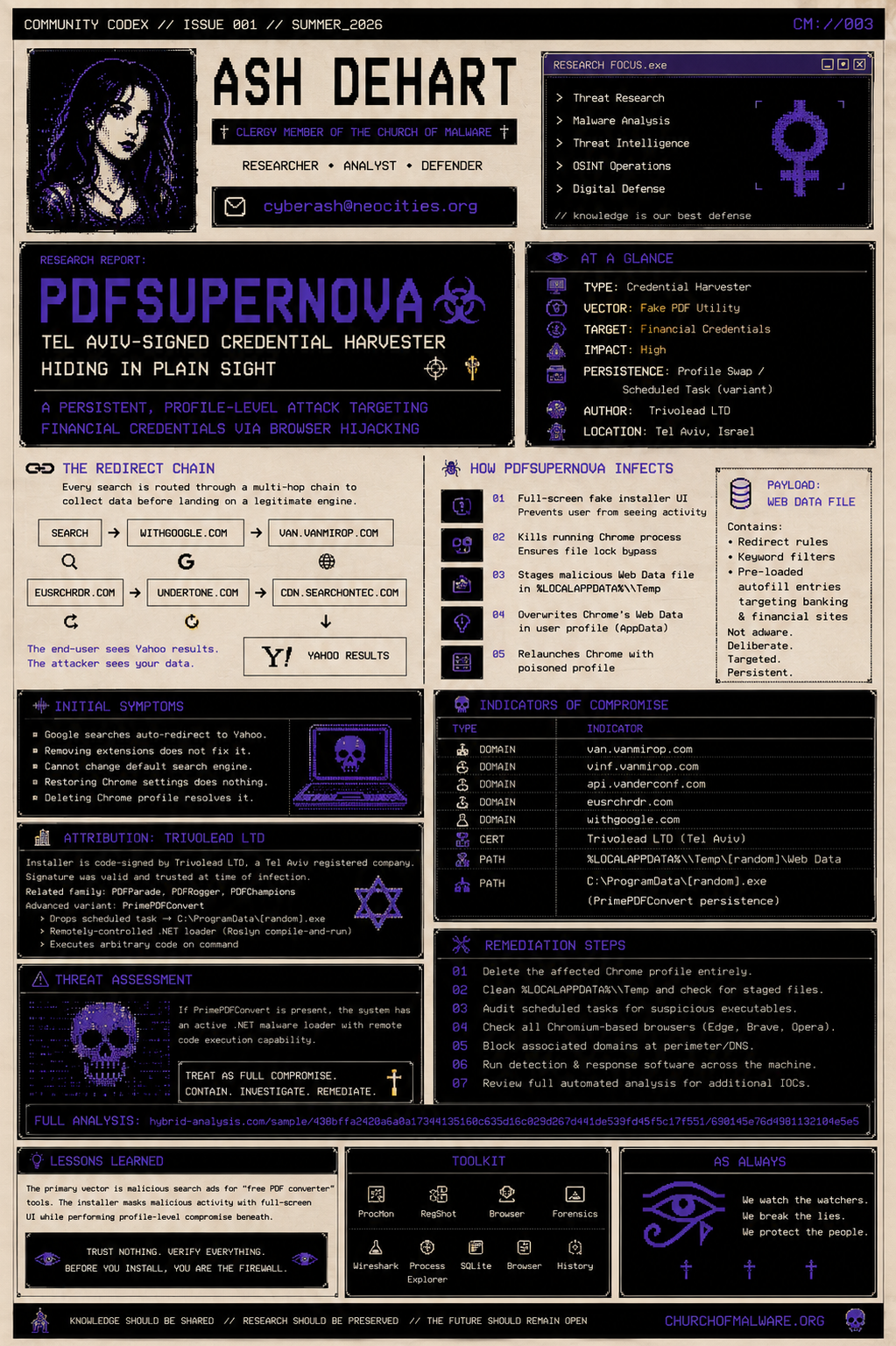
PDFSupernova
** By: Ash DeHart **
PDFSupernova: Tel Aviv-Signed Credential Harvester Hiding in Plain Sight
A browser hijacker landed on a workstation. The initial read: nuisance-level adware, probably sourced from downloading a free PDF tool. Fifteen minutes of triage later, the picture was significantly uglier. An OS-level Chrome profile swap, and embedded targeting for financial credentials.
Initial Symptoms
Every Google search from Chrome auto-redirected through a chain ending at Yahoo. The redirect wasn't a browser extension and removing all extensions didn't fix it. The profile felt wrong: saved passwords behaved oddly, and the default search engine couldn't be overridden through Chrome settings. Even restoring the default Chrome settings did not change anything. Deleting the Chrome profile resolved it immediately, which told me the infection lived inside the profile directory rather than in a system-level persistence mechanism.
What PDFSupernova Actually Does
PDFSupernova is not adware. It's a deliberate credential harvester with adware as the cover story. The installer presents a clean loading UI that takes full-screen focus. This is a technique to prevent the user from seeing what's happening underneath.
While the loading screen is up, the installer:
- Kills the running Chrome process
- Stages a pre-built replacement Web Data SQLite file in %LOCALAPPDATA%\Temp
- Overwrites Chrome's actual Web Data file in the user's AppData profile
- Relaunches Chrome against the poisoned profile
The replacement Web Data file is the payload. It contains keyword filter entries pointing all searches through van.vanmirop.com, and, more importantly, pre-loaded form-fill autofill entries that specifically target banking and financial credential login fields. This isn't opportunistic; someone manually curated those form targets.
The Redirect Chain
Once installed, as soon as you open any Chromium browser, every search routes through a multi-hop redirect chain before landing on a legitimate search engine to avoid raising suspicion:
search query
→ withgoogle.com
→ van.vanmirop.com
→ eusrchrdr.com
→ undertone.com
→ cdn.searchontec.com
→ [Yahoo results]
The hops exist to collect search query data. The end-user sees Yahoo results and may assume nothing is wrong. Meanwhile, the financial form-fill targeting is operating silently against any banking site the user visits.
Attribution: Trivolead LTD
The installer binary is signed by a code-signing certificate issued to Trivolead LTD, a company registered in Tel Aviv. The signature was valid at time of infection and passed basic Windows trust chain verification, which is why it wasn't blocked by default AV at the time of initial analysis (it was nearly fully undetected when first documented in late 2025 by security researcher Luke Acha, published a few months after I had first noticed it as well).
The same entity has been linked to a family of related hijackers: PDFParade, PDFRogger, and PDFChampions, all sharing infrastructure and the same Web Data swap technique. A more advanced variant, PrimePDFConvert, goes further:
- Drops a scheduled task for daily persistence pointing to an executable in C:\ProgramData\
- Acts as a remotely-controlled .NET malware loader using Roslyn-powered code execution (compile-and-run at runtime)
Threat AssessmentIf the variant on your machine is PrimePDFConvert, you have a live loader that can receive and execute arbitrary .NET code remotely. Treat it accordingly.
Indicators of Compromise
DOMAIN van.vanmirop.com Primary redirect destination
DOMAIN vinf.vanmirop.com Telemetry endpoint
DOMAIN api.vanderconf.com POST requests observed in sandbox
DOMAIN eusrchrdr.com Redirect hop
DOMAIN withgoogle.com Redirect hop (typosquat)
CERT Trivolead LTD Code-signing cert, Tel Aviv registration
PATH %LOCALAPPDATA%\Temp[random]\Web Data Staged payload before profile swap
PATH C:\ProgramData[random].exe PrimePDFConvert persistence (if present)
Remediation Steps
- Delete the affected Chrome profile entirely. Do not attempt to repair the Web Data file, it will re-poison the profile on next update. (Learned that the hard way)
- Clean the temp directory. Check %LOCALAPPDATA%\Temp for residual staged files. Look for folders containing a Web Data file with no corresponding Chrome install path. Also look for the PDFSuperNova folder under %APPDATA%
- Audit scheduled tasks. Open Task Scheduler and look for any task pointing to executables under C:\ProgramData\ or %APPDATA%\ with names that don't match known software.
- Check all Chromium-based browsers. Edge, Brave, Opera all store a Web Data file in their respective profile directories. Each one needs to be checked.
- Block associated domains at your perimeter. Add the domains above to your firewall or DNS blocklist.
- Run your detection and response software, like MalwareBytes, across the machine. Even if your preferred tool missed the initial install, post-infection behavioral analysis may catch persistence artifacts the signature didn't.
- Review full automated analysis to inform any additional environment-specific steps here. This is the goldmine you need for preventing this exploit: https://hybrid-analysis.com/sample/438bffa2420a6a0a17344135160c635d16c029d267d441de539fd45f5c17f551/690145e76d4981132104e5e5
Lessons Learned
The vector here was downloading what looked like a free PDF utility. Browser hijackers in this family are almost exclusively distributed through search ads for terms like "free PDF converter," "PDF to Word online," etc. A quick advisory with screenshots of the fake installer UI goes a long way.